

Time tracking
With the time tracking API, you can manage the time worked by employees, and add, update, retrieve and delete their shifts.
The time tracking API only works for Global Payroll.
Independent contractors use timesheets to track their time. For more information, see Timesheets.
Before you begin
Before managing shifts, note the following:
Retrieve your contract ID
Shifts are linked to contracts. Retrieve the contract ID from the GET list of contracts endpoint.
Create your shift rates first
Categorized shifts reference a shift rate by its external_id. Create the shift rates you need before you submit any categorized shifts.
Understand payroll cycles
Shifts are processed and compensated at the end of each payroll cycle. For more information, see Shifts and payroll cycles.
Late shift behavior
If a shift’s payroll cycle reaches its cutoff date, the shift is not rejected by default; it automatically moves to the next payroll cycle and is compensated then. To detect this instead of relying on automatic rollover, see Preventing late submissions with payroll_cycle_ref.date.
Compensation calculation
How a shift is compensated depends on the type of the shift rate it references:
PER_HOUR_FLAT_RATEandPER_UNIT_FLAT_RATE: the rate value is applied directly totime_amount. The worker’s base salary is not used.MULTIPLIER_PERCENTAGE: the rate value is applied as a percentage of the worker’s hourly base salary (or equivalent hourly rate, for non-hourly contracts).
See Manage shift rates for the formula used by each rate type.
Common errors
If a request fails, check Common errors before troubleshooting further. Several error messages, particularly those related to payroll cycles and corrections, are easy to misread.
How the pieces fit together
At a high level, setting up and running time tracking for an employee follows this sequence:
Create shift rates
Create one shift rate for each type of compensation, for example, a flat hourly rate, an overtime multiplier, or a per-unit rate for piecework. Each rate gets an external_id that you reference later.
Submit shifts
Submit categorized shifts that reference a shift rate’s external_id, or submit uncategorized (raw) shifts that only capture start time, end time, and breaks. Raw shifts do not reference a shift rate.
Shift is matched to a payroll cycle
The shift is associated with a payroll cycle based on date_of_work, or explicitly via payroll_cycle_ref.date if you want to guard against late submissions.
Submission must land before cutoff
For shifts created through this API, the submission timestamp is what counts; there is no separate manager approval step. The shift must be submitted before the payroll cycle’s cutoff date to be processed in that cycle. See Shifts and payroll cycles for what happens if it lands after the cutoff.
Cycle is compensated
At the cutoff date, all shifts submitted for the cycle are compensated according to their shift rate.
Adjust with corrections, if needed
Once a shift has been processed for payroll, you can no longer update or delete it directly. Use correction shifts to adjust the payable amount without touching historical payroll data.
Shift types
Shifts can be submitted in two formats:
Shifts with known pay codes and rates defined in Deel.
Granular shifts capturing start time, end time, and break information.
Categorized shifts
Categorized shifts are suited for when shifts are categorized outside Deel and the shift rates (pay codes/category) are known. To use this API, you must first create shift rates in Deel and then reference those shift rates when submitting categorized shifts.
Following is an example of a categorized shift:
Uncategorized (raw) shifts
Uncategorized shifts are used to capture the shift information in a more granular way. Unlike categorized shifts, which capture summary information such as total hours worked, uncategorized shifts capture granular start time, end time, and break information. There is no need to set up a shift rate for uncategorized shifts.
Shifts and payroll cycles
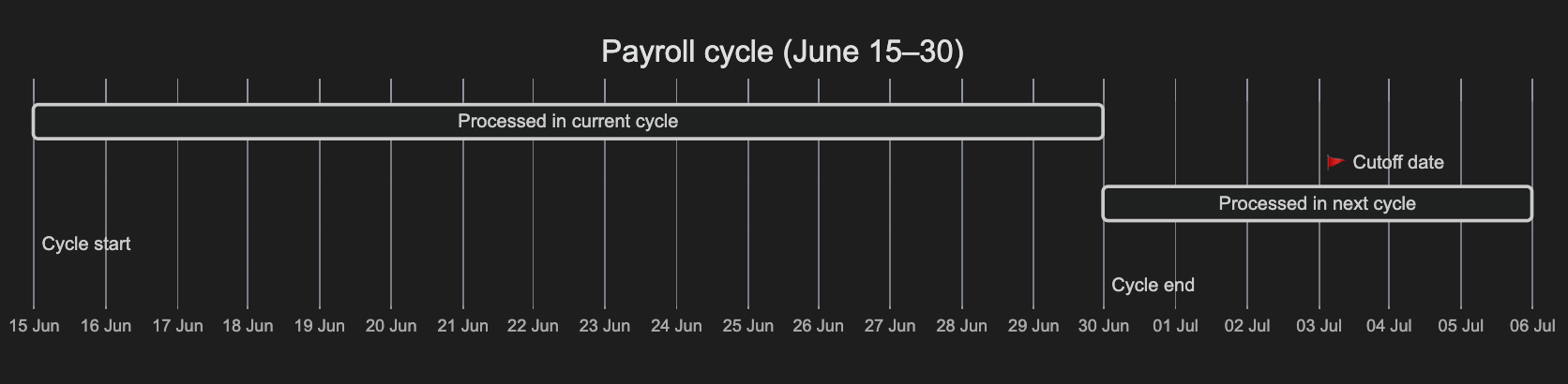
When you submit a shift, it’s automatically associated with the relevant payroll cycle based on the submission timestamp and the cycle’s cutoff date. For shifts created through this API, only the submission timestamp counts; there is no separate manager approval step. The cutoff date marks the last day you can submit a shift for processing within the current payroll cycle.
- If the shift is submitted before the cutoff date, it is processed within the current cycle
- If the shift is submitted after the cutoff date, it is processed in the next cycle
The payroll calendar is configured per entity by your Deel representative when you onboard. That is when you decide the cutoff dates. If you have questions about your cutoff dates, contact your Deel representative. For more information, see Understanding the Deel Global Payroll Calendar.
Contact support for late shift submissions
If the payroll cutoff date has already passed and waiting for the next cycle for the shift to be processed is not an option for you, you can contact support to process the shift in a special off-cycle payroll run. Off-cycle payroll runs have an additional fee that depends on your contract agreement.
Make sure to provide the shift details via a CSV file through the support channel.
Preventing late submissions with payroll_cycle_ref.date
You can include the optional payroll_cycle_ref.date parameter when submitting a shift to declare your intended payroll cycle. The system compares the request’s timestamp against that cycle’s cutoff date, so the shift is only accepted into the specified cycle if the submission is timely; otherwise, the request is rejected instead of silently rolling over.
The following table compares this to omitting the parameter:
A shift that rolls over to the next payroll cycle is compensated with that cycle, not the one its date_of_work originally fell in. In practice, this means payment lands roughly one full payroll cycle later than expected.
The following example shows how to use the payroll_cycle_ref.date parameter:
The payroll_cycle_ref.date follows the ISO 8601 date and time format. You can use any date within the cycle’s start and end dates, but we recommend using the cycle’s end date for clarity.
Manage shifts
This section covers how to add, update, and delete shifts for an employee.
Add shifts
This section covers how to add shifts for an employee. There are different endpoints available for adding shifts based on the shift type:
Add shifts with known pay codes and rates.
Legacy method (not recommended).
Add granular shifts with detailed time information.
Add categorized shifts
You can add multiple categorized shifts for a single contract by providing an array of shifts. You can add a shift using any of the following time units: HOUR , DAY , WEEK , and MONTH.
Create a shift rate
Before submitting a categorized shift, create a shift rate and note its external_id.
Add categorized shifts (Legacy)
This method is still supported, but it is recommended to use Add categorized shifts instead.
This shift type adds a shift without requiring time_amount and time_unit in the request body. By default, time_amount is set to summary.total_payable_hours and time_unit is set to HOUR. You can perform the same operations on these shifts as you would with categorized shifts by using the same payload.
Create a shift rate
Before submitting a categorized shift, create a shift rate and note its external_id.
Add uncategorized (raw) shifts
You can add multiple uncategorized shifts for a single contract by providing an array of shifts.
List shifts in your organization
You can list the shifts in your organization and sort them by the time of creation.
Make the request
Make a GET request to the List time tracking shifts endpoint.
In the query:
Use the array syntax contract_id[]=value to filter for contract IDs. For multiple contract IDs, you can use contract_id[]=value1&contract_id[]=value2.
Retrieve a single shift
You can retrieve the information of a single shift using the external_id of the shift.
Update shifts
You can update a shift before it is processed for payroll. After a shift is processed, your ability to amend it depends on the shift type:
- You can amend a categorized shift using correction shifts
- You cannot amend uncategorized (raw) shifts
This section explains how to update shifts that have not been processed for payroll:
Update categorized shift for an employee
You can update the information of a categorized shift.
You can only update shifts that have not been processed for payroll. Shifts are processed for payroll at the cutoff date.
Make the request
Make a PATCH request to the Update a time tracking shift endpoint.
In the path:
In the body:
Update uncategorized (raw) shift for an employee
You can update the information of an uncategorized shift.
You can only update shifts that have not been processed for payroll. Shifts are processed for payroll at the cutoff date.
Make the request
Make a PATCH request to the Update a raw time tracking shift endpoint.
In the path:
In the body:
Delete shift for a contract
You can delete a shift for a contract by using the external_id of the shift.
You can only delete shifts that have not been processed for payroll. Shifts are processed for payroll at the cutoff date.
Correction shifts
When you need to adjust hours for shifts that have already been processed for payroll, you can use correction shifts. Corrections create a new shift entry that adjusts the payable hours of the original shift. The correction will be processed in the next payroll cycle, ensuring accurate compensation without modifying historical payroll data.
The sequence below covers when a correction is accepted or rejected. See Common errors for the exact rejection messages.
Two additional rules to keep in mind:
- Correction shifts cannot be submitted for another correction shift.
- Correction shifts cannot be updated but can be deleted.
To submit a correction, use the same Create a time tracking shift endpoint, by specifying CORRECTION_DELTA as the shift_type and including a corrections array with additional fields to specify the correction details.
Identify the shift to correct
For example, you may have previously created a shift with 10 total payable hours and this shift has been already processed for payroll. If you later discover that the actual hours worked were 7.5, which requires a reduction of 2.5 hours, note the original shift’s external_id.
Submit the correction
Make a POST request to the Create a time tracking shift endpoint with the correction details.
In the body:
Manage shift rates
Shift rates are used in payroll calculations to define the amount of salary to be paid for a specific shift. The shift rate types are:
PER_HOUR_FLAT_RATE and PER_UNIT_FLAT_RATE apply their value directly to summary.time_amount and do not use summary.time_unit in the calculation.time_amount can represent hours, units, or any other count you choose to submit. MULTIPLIER_PERCENTAGE is the only rate type that reads the worker’s base salary, and it only produces an amount when summary.time_unit is HOUR. Submitting a MULTIPLIER_PERCENTAGE shift with time_unit set to DAY, WEEK, or MONTH will not be compensated, since there is no base-salary conversion for those units.
Create a shift rate
You can create shift rates for your organization, which you can then map to individual shifts when adding them.
For example, to create a per-unit rate for piecework, such as $2.50 per delivery, use PER_UNIT_FLAT_RATE as the type:
Reference this rate’s external_id from a categorized shift’s summary.shift_rate_external_id, and set summary.time_amount to the number of units completed (for example, 40 for 40 deliveries). See Add categorized shifts.
Retrieve a shift rate
You can retrieve a shift rate using the external_id of the shift rate.
Make the request
Make a GET request to the Retrieve a single time tracking shift rate endpoint.
Where:
List shift rates
You can retrieve the list of shift rates for your organization.
Update a shift rate
You can update a shift rate if it’s not being used in any shift, by using the external_id of the shift rate.
Only shift rates that are not used in any shift can be updated.
Make the request
Make a PATCH request to the Update a time tracking shift rate endpoint.
In the path:
In the body:
Delete a shift rate
You can delete a shift rate if it’s not being used in any shift, by using the external_id of the shift rate.
Only shift rates that are not used in any shift can be deleted.
Common errors
Most errors return a 400, 404, or 422 response with a self-explanatory message, for example, a missing organization ID or a shift that does not exist. This section covers the errors whose cause is not obvious from the message alone.
Payroll cycle already closed
A message about the payroll cycle being closed can mean two different things, depending on when you see it:
The first only happens if you explicitly set payroll_cycle_ref.date — see Preventing late submissions. If you omit payroll_cycle_ref, the shift is never rejected for being late; it rolls over silently to the next cycle instead. The second happens any time you try to modify a shift after its cycle has already been compensated. Use a correction shift instead.
Shift rate type mismatch on update
400 — Cannot update rate associated with the shift: the type of the new rate must match the type of the original rate.
A shift can be repointed to a different shift rate of the same type, for example, swapping one PER_HOUR_FLAT_RATE for another, but not to a shift rate of a different type, such as switching from PER_HOUR_FLAT_RATE to MULTIPLIER_PERCENTAGE.
Shift rate is already in use
409 — The shiftRate with id: '{id}' is currently in use and cannot be updated/deleted
A shift rate becomes locked as soon as any shift references it. To change its value or delete it, first confirm no shift still references it, or create a new shift rate instead.
Correction shift errors
Corrections carry a few rules that are not obvious from the request shape alone:
Cannot apply correction to shift {id}. Correction can only be applied to a regular shift that has been exported.(400): A correction can only target a shift that has already been processed for payroll. If the original shift has not been processed yet, update it directly instead of submitting a correction.Cannot apply correction to shift {id}. Only summary shifts can be corrected.(400): Corrections only work on categorized shifts. Uncategorized (raw) shifts cannot be corrected.Cannot apply {type} correction to shift {id}. {otherType} corrections have already been applied to this shift.(400): Once anADDITIONcorrection has been applied to a shift, you cannot later apply aSUBTRACTIONcorrection to the same shift, and vice versa. Corrections to a given shift must stay in one direction.Cannot apply correction to shift {id}. Subtraction correction would result in an overall negative value(400): ASUBTRACTIONcorrection cannot reduce the shift’s payable amount below zero.Cannot submit multiple corrections for the same shift reference ID: {ids}(400): A single request cannot contain two corrections for the same original shift. Submit them one at a time, or combine the adjustment into a single correction.